Cargo
$ cargo build --bin uv
libuv.rlib
ACD→
Waiting
uv
ABC→
Waiting
uv.d
E→
Waiting
Writing outputs


We’re rewriting Nix in Rust, and it needs to be split into layers and modernized.
Its storage, build machinery, and higher-level tools can each be useful on their own.
You should be able to use one layer without adopting the whole stack.
That matters even more in agentic development. Agents produce more source code, more versions of it, and more build artifacts as they explore and test changes.
Keeping every copy quickly becomes expensive, but throwing everything away means rebuilding or regenerating work you might need again.
Developers are sharing screenshots of disks filled with target/ directories in a matter of hours.
It feels familiar to how Nix users who have had to garbage collect
their /nix/store: which artifacts are still useful, which ones can go, and how to reclaim space without losing what another project still needs.
Casita is our first standalone layer, a content-addressed object store for source code and build artifacts, with shared storage, verification, synchronization, and garbage collection.
It is still pre-release and available as a Rust library and CLI. We’re targeting Linux, macOS, and Windows.
Rust workspaces and throwaway checkouts can accumulate target/ directories.
Deleting them discards artifacts a later build might reuse; keeping them
duplicates bytes across similar projects. Cargo
and uv cache downloaded
dependencies, but their caches do not manage source versions and generated
outputs across projects.
We added an ArtifactStorage interface
so Cargo can prepare and persist registry archives, Git dependencies, and
workspace build outputs through different backends. The filesystem backend
preserves Cargo’s usual behavior.
The Casita backend imports and restores that content through local IPC, while Cargo still decides what to download and build. This remains experimental: import and restore performance has not yet matched the filesystem backend. The development branch and Cargo guide have the details.
Think of Casita’s storage model as a generalized Git object database. Git has blobs, trees, and commits. Casita stores immutable byte blobs and immutable object records: each format defines an object’s identity and its links to other objects. A directory links to its files and subdirectories; a Git commit links to a tree and its parents. Casita follows those links to find a complete saved version.
Every blob has a BLAKE3 hash of its complete bytes. BLAKE3 computes that hash as the root of a Merkle tree. Casita can keep an optional Bao outboard with the tree’s intermediate hashes, so a reader can verify one range against the blob’s hash without reading the whole blob. A full sequential read checks the complete hash. The storage backend may chunk and compress the bytes without changing their address.
An object record gives those bytes meaning and links. For src/main.rs, a file
record points to the blob containing its source code. The src/ directory has
its own record, which links to that file record and points to a blob encoding
the directory entries. These records form a graph above the blobs.
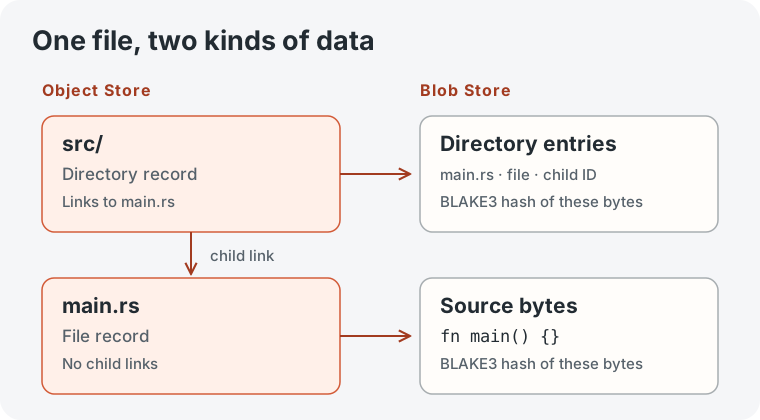
For this filesystem tree, the hashes connect roughly like this:
main.rs ID = BLAKE3(file bytes)src/ ID = BLAKE3(canonical entries containing main.rs ID)Changing main.rs creates a new file ID, which changes the src/ directory
ID and the IDs of its parent directories. Unchanged files keep their IDs and
stored bytes. The old blobs and records are never rewritten.
The blob’s BLAKE3 hash and a source format’s hash serve different purposes. A Git commit keeps its native Git ID while Casita addresses its body bytes by their BLAKE3 hash. A Nix archive (NAR) has a SHA-256 hash of its canonical serialization. Casita measures that NAR hash, then stores the archive’s files as a graph of BLAKE3-addressed blobs. The verified object records let Casita traverse the graph without decoding every payload.
Read Blob Storage and the repository model for the detailed contracts. The NAR IPC guide shows how to import and restore an archive.
An application gives a saved graph a name, called a root. The root points to one exact object and keeps everything reachable from it. The objects and blobs stay immutable; the application can move or remove the root as its needs change.
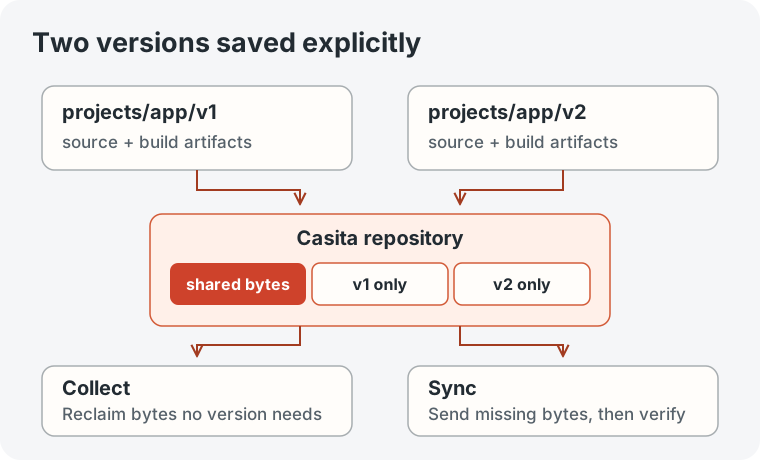
Applications can save separate versions explicitly. For example, import a
project directory after two revisions under projects/app/v1 and
projects/app/v2. The imports leave the original working directory in place.
Both names keep their versions available, and identical files share one blob.
An application could also point projects/app/current at the same object as
v2, then move that name to a later version without changing either saved
graph.
Casita follows links from a root to find its complete graph for synchronization and retention. Removing a name makes objects needed only by that name eligible for garbage collection once active work releases them; files and chunks shared with another root remain.
Roots are permanent by default, which suits saved Git histories and releases.
Rebuildable data, such as a Cargo target/ directory, can instead use an
evictable root:
casita import ./target --root cargo/my-app/target --retention evictablecasita root ls cargo/my-app/target --longThe CLI can also change retention later with root retention.
The Rust API provides set_root_with_retention and
touch_root for applications that manage their own cache roots. Marking a root
evictable does not remove it immediately.
Importers turn inputs into graphs that Casita can verify and retain. The filesystem importer walks a directory; the tar importer reads an archive without extracting it first; and the NAR importer measures a Nix archive’s canonical SHA-256 while storing its files as a graph. The Git importer keeps native Git object IDs and a view of selected branches and tags.
Each importer uses the same repository publication and retention rules. Once content is saved under a root, Casita can synchronize it and collect it when no name or active work needs it.
Casitar writes a complete saved graph to a portable
.casitar archive. You can pass it through a file, pipe, or release artifact
when the source repository is unavailable to the receiver. On import, Casita
checks every payload and object record, verifies that the archive contains the
whole graph, and then publishes the destination roots together. The archive
carries object identities and bytes, independent of the source repository’s
packing and database layout.
The experimental Gix object database adapter reads and writes native Git objects through Casita. Git’s SHA-1 or SHA-256 IDs stay intact while Casita verifies and stores the object bodies and their links. The adapter covers object storage; a complete Git repository also needs its refs, index, and working tree integrated. The example writes a blob, tree, and commit, then reopens the store and reads the commit back.
The companion CasitaFS crate presents a saved filesystem tree as a read-only mount. Existing tools can browse its files without first checking out the whole tree. It uses FUSE on Linux and a native FSKit extension on macOS 26 or later. The macOS extension requires explicit setup for each user.
Suppose a second repository already has projects/app/v1. Syncing
projects/app/v2 reuses what is there and sends missing content. Compatible
stores can reuse chunks within changed files too. The destination checks
incoming objects against their format’s rules and verifies that the whole
saved version arrived before it updates the name. An interrupted transfer can
be retried without exposing a partial version through that name.
Local repository sync is implemented in the CLI and Rust library. An optional SSH source uses OpenSSH for the connection while the receiving Casita repository still verifies what arrives. Sync adds content; removing destination names and collecting unused data are separate actions. See Synchronization for local, SSH, and selective workflows.
If both projects/app/v1 and projects/app/v2 are named, Casita keeps both.
Remove the first name and run collection: bytes needed only by v1 can go,
while files and chunks shared with v2 stay. Active readers and writers also
hold on to the data they are using during collection.
The local CLI can preview a pass with gc --dry-run before running gc.
Automatic collection helps keep a busy disk from filling up. In the standard
local repository, starting a mutation when the filesystem is at least 80% full
triggers a nonblocking collection attempt. Casita first reclaims data no root
or active operation needs. If disk use remains at or above 75%, it releases
the least recently used roots explicitly marked evictable, vacuuming after
each release until use falls below 75% or no eligible roots remain. Permanent
roots stay, and manual gc preserves every named root, including evictable
ones.
Collection applies to the Casita repository. See Garbage Collection for the retention and recovery rules.
Two runners can use the same S3 bucket and prefix to publish objects and read named versions. Their payload bytes are immutable, but names and object records change as new versions arrive. Casita records those changes in Chroma’s wal3, a write-ahead log stored in S3. Conditional updates to its manifest give competing writers an agreed order for their changes.
Readers and writers register durable holds so collection preserves data still
in use. The S3 profile is experimental and requires the s3 feature; an
abandoned hold needs explicit recovery. The shared S3 guide
shows how independent owners can use one repository, and S3
maintenance covers collection and recovery.
Casita runs from a source checkout today, but we have not tagged v0.1.0.
Before the first release, we need to improve performance where benchmarks show
bottlenecks, broaden benchmark coverage, and use Casita in more real projects
and end-to-end workflows. That practical use should expose problems we can fix
before calling 0.1 ready.
The integrations have more work ahead. Cargo’s Casita backend needs faster import and restore before it can match the filesystem backend. The Git object store adapter still needs integration with the rest of a Git repository.
From a Casita source checkout, install the CLI, then import a directory into the default repository, list its roots, and preview collection:
cargo install --path crates/casitacasita import ./src --root examples/sourcecasita root lscasita gc --dry-runWhen roots and object records are in one Casita repository and the matching blobs are in another, choose the blob source during sync:
casita sync --from ./metadata-store \ --from-blobs ./blob-store \ --to ./mirror \ --root examples/sourceThe sync guide explains the requirements for a separate blob source.
The Quick Start walks through checkout and inspection, and the Library guide shows the supported Rust API.
Our filesystem benchmark compares imports with Git add and commit. In that run, Casita imported the large-file corpus faster, while Git was faster for small-file imports and unchanged re-imports. The full benchmark reference includes methodology and separate native Git measurements.